|
||
Improvements in SESTrainSimulatorThis year, development in SESTrainSimulator focused on improving the accessibility and reusability of the already-run results to reduce as much as possible simulation time. All results obtained from previous computations are stored and will be reused whenever the conditions in which they were obtained persist. The new Manage Results table is accessible from the ribbon in the Computation Options group. As shown in the figure below, the table includes every time entry found in the Train Data. For convenience, the time in seconds, the necessary format for the software, is also shown in hours, minutes and seconds from the start of the day. A color-coded column indicates if the results for a given time already exist. A red cell indicates that no computation results for the instant exist in the project database, a green one indicates that the results exist, while a yellow one indicates that results exist, but for a different combination of active tracks. Sequences of identical status are collapsible. You define a new range using the checkboxes in the last column named Include in results. If a continuous selection is only made of green cells, the Recombine button gets enabled. By clicking it, the software will launch SESCombiner to create new set of combined f21 and will directly go to examine view. If a continuous selection contains at least one yellow or red cell, the user can click on Update simulation time to update the Simulation Start Time and Simulation End Time to match the selection. When computations are launched, only the times corresponding to yellow and red cells will be run, the green cell results will be reused. In this scenario, the yellow cell results are not lost; they are kept in case the user activates/deactivates the tracks that produce this result. Note that if the template model is accessed, or if the train data changes, then all results become obsolete and a message will propose deleting them. 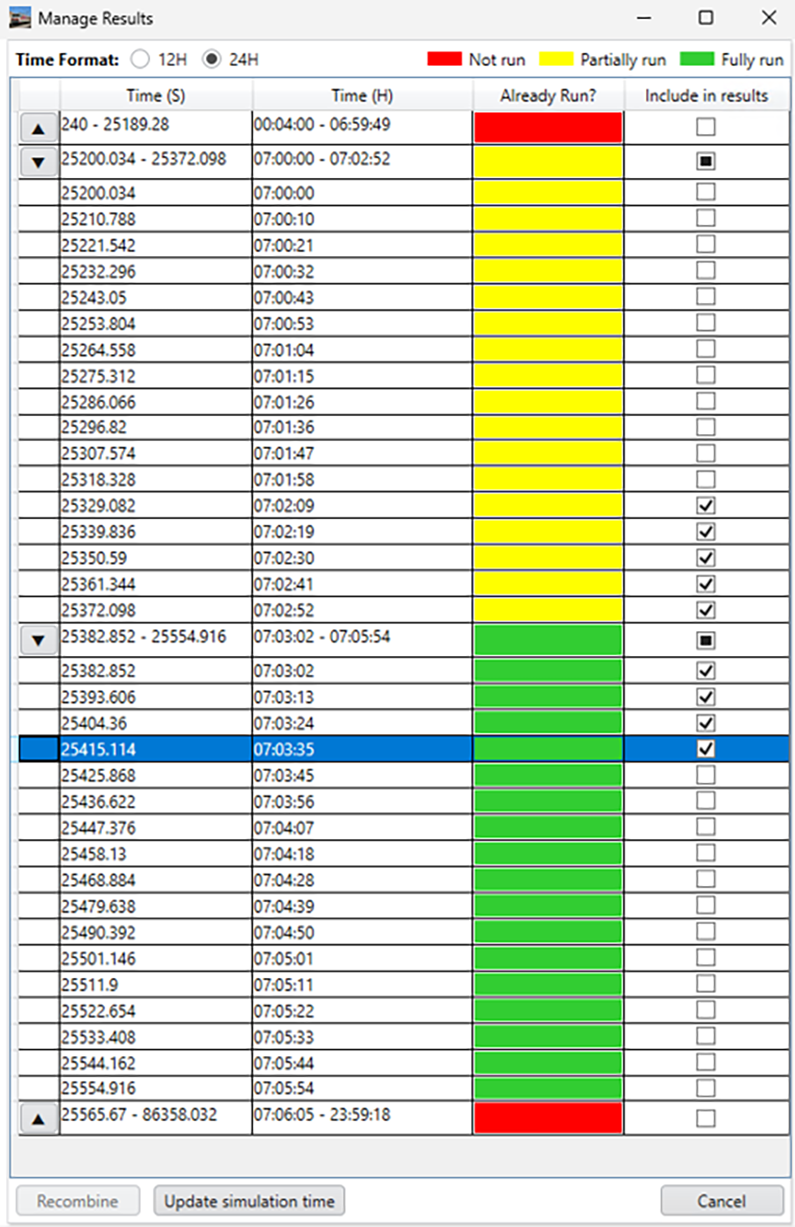
The Manage Results table accessible from the |
||
|
||
|
SES & technologies ltd. 3055 Blvd. des Oiseaux, Laval, Quebec, Canada, H7L 6E8 +1 (450) 622-5000 info@sestech.com ©2026 SafEngServices & technologies ltd. |