|
||
SESConverter3DSESConverter3D has undergone significant development since its introduction at UGC 2025, with major improvements focused on expanding CAD conversion capabilities, improving usability, and strengthening integration with SES Software applications. Support for AutoCAD entity conversion has been significantly expanded and now includes entities such as Spline, 3DFace, Mesh, Polyline3D, Insert (block reference), Hatch, and BRep objects. New Entity and Block configuration tabs allow users to selectively control the conversion of detected entities and CAD blocks, enabling SESConverter3D to support the vast majority of practical CAD-to-SES conversion workflows. The interaction between the configuration tables and the interactive 3D environment has also been improved. Selecting an object in the 3D view now automatically highlights the corresponding entry in the Layers table, while the new Go To functionality shown in the following figure allows users to directly locate entities inside the 3D model from the tables. These additions greatly simplify navigation and validation of complex CAD models. 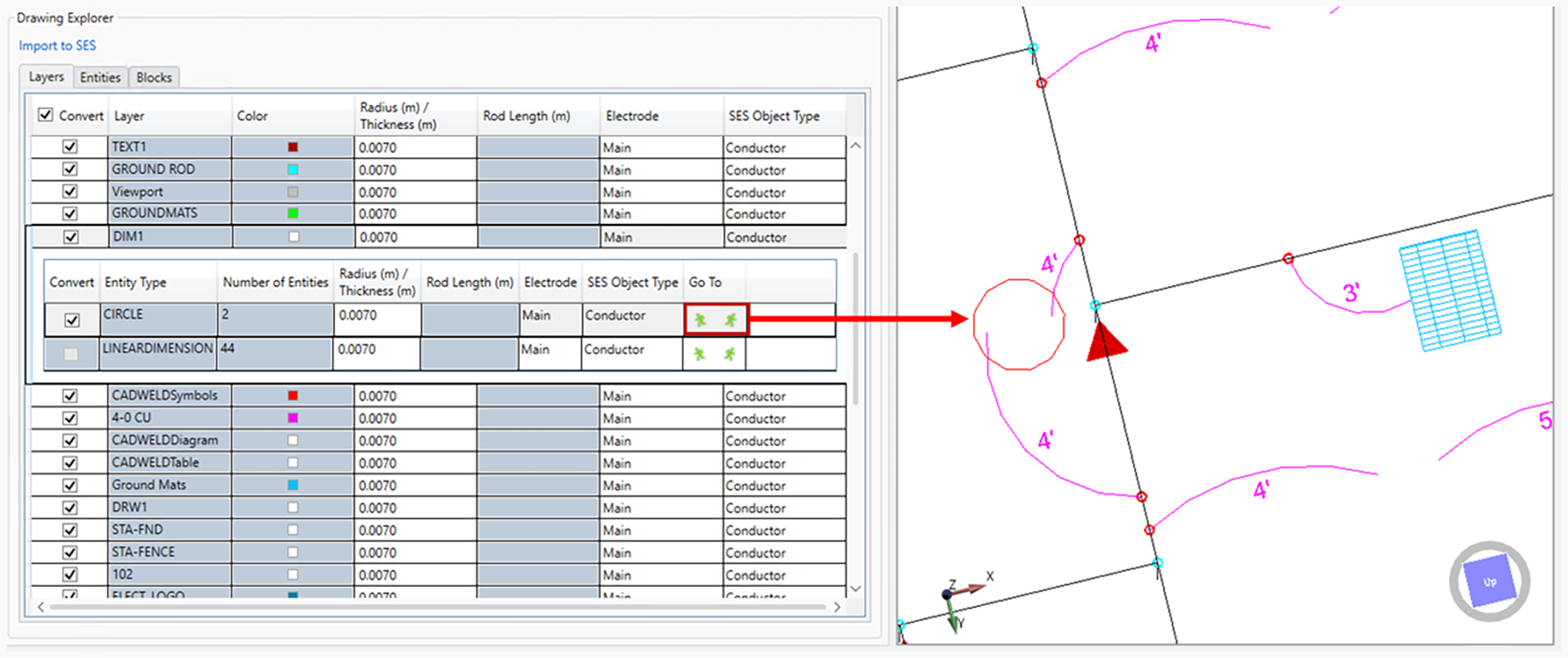
New Go To feature allowing to quickly jump to entity in the interactive 3D view. SESConverter3D now also supports persistent SES data embedded directly inside DWG/DXF files, allowing conversion settings and SES-related data to remain associated with the CAD model. Additional improvements include support for interactive 3D PDF export and import, automatic CAD unit detection and scaling, dedicated 3D block visualization windows, persistent camera positioning during refresh operations, and real-time SES-to-CAD preview capabilities. Together, these improvements significantly enhance the maturity and efficiency of the software. See the article entitled “Recent Developments in SESConverter3D: An Interactive 3D CAD Conversion Tool for CDEGS” in these Proceedings for further details. |
||
|
||
|
SES & technologies ltd. 3055 Blvd. des Oiseaux, Laval, Quebec, Canada, H7L 6E8 +1 (450) 622-5000 info@sestech.com ©2026 SafEngServices & technologies ltd. |